TEAM HCiSO | 14 September 2025 | 1.28 GB
Ozone 12 is an all-in-one suite of 20 pro tools designed for modern mastering, accelerated by a time-saving, AI-powered assistant. Building on over two decades of award-winning, cutting-edge innovation, Ozone 12 keeps you in full control while offering previously impossible mastering workflows. Whether it’s your first track or the latest in a long line of hits, this is everything you need to bring your creative vision to life.
→ Why Ozone?
All you need, all in one place
If your track needs it, Ozone has it. Cover every part of a modern mastering chain – plus hidden-gem tools to do even more – with 20 full-featured modules, all in a single mastering hub. Streamline the full process and avoid the unnecessary cost of tons of separate plugins.
Intelligent tech for any workflow
Ozone fits your approach to mastering. Build your chain from scratch, or let the AI-powered Master Assistant create a tailor-made preset for your audio, and tweak from there. This isn’t upload-and-cross-your-fingers, it’s calling the shots with creative control.
Advanced DSP for premium results
As a trailblazer in the space for nearly 25 years, Ozone pushes the boundaries of what’s possible in mastering. Discover the “wait, you can do that now?” tech behind countless chart-topping tracks, with seamless flows that put decades of power right at your fingertips.
→ What’s new in Ozone 12?
The newest version of Ozone introduces introduces 3 brand-new plugins, an overhauled Master Assistant experience for more creative control, and the latest mastering tech for louder, cleaner masters. Watch it in action here.
Lock in your low end, reshape your balance, and revive crushed mixesDiscover 3 brand-new plugins to perfect your sound. Give your lows the power and control to translate with Bass Control. Fine-tune your vocals, bass, drums, and more – without the mix – in Stem EQ. And “undo” overly compressed audio with the groundbreaking Unlimiter.
Save time with AI-powered flows that keep you in the driver’s seatExperience more creative control in Master Assistant than ever before with the new Custom flow. Pick from dozens of genre profiles, upload your own references, set a LUFS target, toggle which modules to use, define processing strength, and tons more.
Achieve louder, cleaner masters without the typical tradeoffsPush your masters even harder with the IRC 5 limiting mode – the most advanced algorithm yet in Ozone’s fan-favorite Maximizer. Shape impactful masters with stunning clarity, even at high LUFS. No pumping. No distortion. Just pure professional polish.
→ New Features:
NEW: Stem EQ
Thin vocals? Overpowered drums? Impossible to fix without the mix file, right? Not anymore. Unlock unprecedented control over your master with Stem EQ. Avoid tedious mix edits by separately EQing the vocals, bass, drums, and instruments in your stereo bounce. With an easy, feels-like-magic flow, this is all you need to have the final say over your final balance.
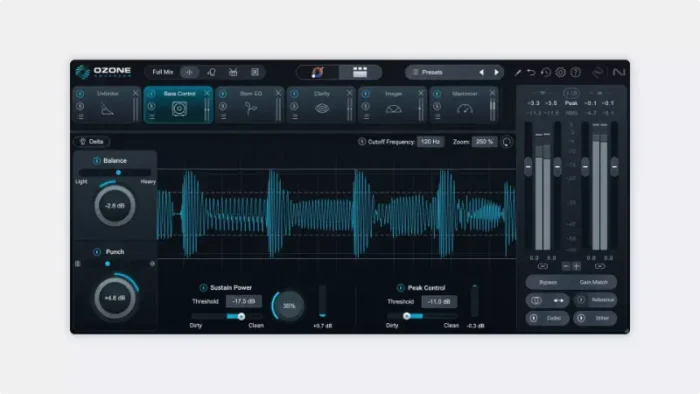
NEW: Bass Control
Lock in your low end in any listening environment. Whether you’re fixing a weak mix, tightening a kick, or adding subtle weight, easily shape low end energy while enhancing balance, control, and punch with Bass Control. No more guesswork. Make sure your masters hit hard in the car, the club, and the charts.
NEW: Unlimiter
Your new “undo” button for overly compressed audio, using cutting-edge machine learning to bring back lost transients and revive tracks transparently. Just set the threshold (or click Learn) and turn up the missing peaks to restore punch and open up tracks for easier,
cleaner mastering.
NEW: Custom Master Assistant flow
Call the shots with the new ‘Custom’ Master Assistant flow. Looking for full transparency? A more aggressive edge? Pick from dozens of genre targets, toggle modules, and set loudness levels to create a module chain that’s truly yours. Save time and finalize your track with confidence – all without ever losing creative control.
NEW: IRC 5 limiting algorithm
Push your masters harder than ever without the usual tradeoffs. Achieve outstanding loudness and stunning clarity with the new IRC 5 limiting mode – the most advanced algorithm yet for Ozone’s fan-favorite Maximizer. Easily craft clean, open masters, even at high LUFS. No pumping. No distortion. Just pure pro polish.
And more…
Split stems with new levels of precision and fewer artifacts thanks new neural nets in Stem Focus. Sculpt a balanced sound across a broader range with 25 new genre targets for Stabilizer. And master in style with a fresh interface, featuring a new design and color palette that invite you to step in and take control.
→ Core Plugins/Modules
Mix-and-match Ozone’s 20 full-featured tools to design your own mastering chain in the “mothership” hub plugin, or use each individual tool as its own component plugin in your DAW as part of Ozone Advanced.
NEW! Stem EQ
Prevent tedious mix fixes by separately EQing vocals, bass, drums, and instruments in your masters.
NEW! Bass Control
Add drive, punch, and balance to your low end with new levels of ease, regardless of your listening environment.
NEW! Unlimiter
Hit “undo” on overly compressed audio, reintroducing lost dynamics with industry-first machine learning tech.
Clarity
Easily achieve a smooth, professional, and polished master that maximizes loudness without penalties.
Maximizer [NEW! IRC 5]
Max out power and clarity without the usual tradeoffs with our most advanced limiting algorithm yet.
Equalizer
Get full control over the finest details of your sound with fluid metering and HUD controls.
Impact
Enhance the rhythm and feel of your tracks by intuitively controlling microdynamics.
Stabilizer [NEW! +25 targets]
Sculpt a balanced sound with this intelligent and adaptive mastering EQ featuring 25 new genre targets.
Imager
Add natural stereo width to narrow mixes in Stereoize mode or enhance mono with Recover Sides.
Match EQ
Match to any reference track with over 8,000 separate bands to get the most precise snapshot possible.
Master Rebalance
Adjust the volume of the drums, bass, or vocals in ANY audio track, even a bounced mix.
Low End Focus
Get clear and punchy low frequencies and avoid artifacts from EQ and compression.
Spectral Shaper
Add instant polish and control harsh frequencies with dynamic spectral shaping technology.
Dynamic EQ
Use an intuitive GUIto make frequency boosts and cuts that respond to the dynamics of your audio.
Exciter
Mix and match between seven different types of distortion to add warmth and character.
Dynamics
The mastering engineer’s most versatile tool. Tame dynamic mixes and give your tracks energy.
Vintage Tape
Introduce rich saturation with all the frequency coloration, distortion, and phase effects of tape.
Vintage Compressor
Add colorful dynamics with compression modeled after famous mastering hardware.
Vintage Limiter
Glue your mix together for louder, fuller tracks and give your masters a bit of additional vintage character.
Vintage EQ
Brighten your master, smooth out heavy low end, and add body to your digital recordings.
→ Other Features & Utilities
Mix-and-match Ozone’s 20 full-featured tools to design your own mastering chain in the “mothership” hub plugin, or use each individual tool as its own component plugin in your DAW as part of Ozone Advanced.
Master Assistant View
See the big picture of your Ozone processing with macros for key controls, all in one place.
Custom Assistant flow
Save time and finalize your track with confidence – all while keeping creative control.
Stem Focus
Apply your full Ozone chain to an single stem to control the internal balance of a mixed file with precision.
Track Referencing
Add reference tracks directly into Ozone to manage your full mastering session from a single plugin window.
Transient/Sustain modes
Enhance transient or sustain material by applying Ozone modules to a specific “channel mode”.
Assistive Vocal Balance
Achieve clear, perfectly-balanced vocals without needing the mix to bring out the emotion in your music.
Dither
Ozone’s extensive suite of dithering options help you ensure no audible loss of audio quality.
Codec Preview
Hear your mix as an MP3/AAC at 8 resolutions, letting you test any loss of audio quality before release day.
Supported Operation System:
• macOS 13.7 or later
• Apple Silicon or Intel Core processor
https://www.youtube.com/watch?v=lwIuaD8O61M
INFO / DEMO : HOME
Please REPORT Broken Links in the Comment